
The closest Electron alternative in 2026 is Tauri. It keeps your web UI, swaps Node.js for Rust, and uses the browser engine the OS already has, so our test app’s installer shrank from 106.1 MB to 1.05 MB. Pick Wails if your team writes Go, Avalonia if it writes C# and needs Linux, Flutter if you’d rather drop HTML and CSS altogether, and stay on Electron if identical rendering on every OS matters more than size.
Who this is for: teams with an Electron app that feels too heavy, or choosing a desktop stack for a new app. Who should look elsewhere: if your app is already shipping on Electron and users aren’t complaining about size, a rewrite rarely pays for itself. Read Tauri or Electron in 2026 first.
How we checked
We built the same small app in Electron, Tauri, Wails, WPF, and Avalonia on one Windows 11 laptop and measured download size and idle memory. The method, the hardware, and every line of code are in our Tauri vs Electron vs WPF benchmark. We didn’t build Flutter, .NET MAUI, Neutralinojs, or Electrobun, so for those we quote their own docs and say so.
Versions, release dates, licences, and GitHub stars come from each project’s GitHub page or official docs, checked 2026-10-13.
The pages that rank for “Electron alternatives” today are a vendor ranking its own product first (TeamDev’s MōBrowser post), crowd-sourced lists (AlternativeTo), and software directories that mix in tools that aren’t desktop frameworks at all. None of the ones we read published a measurement of their own. That’s the gap this page fills.
The comparison
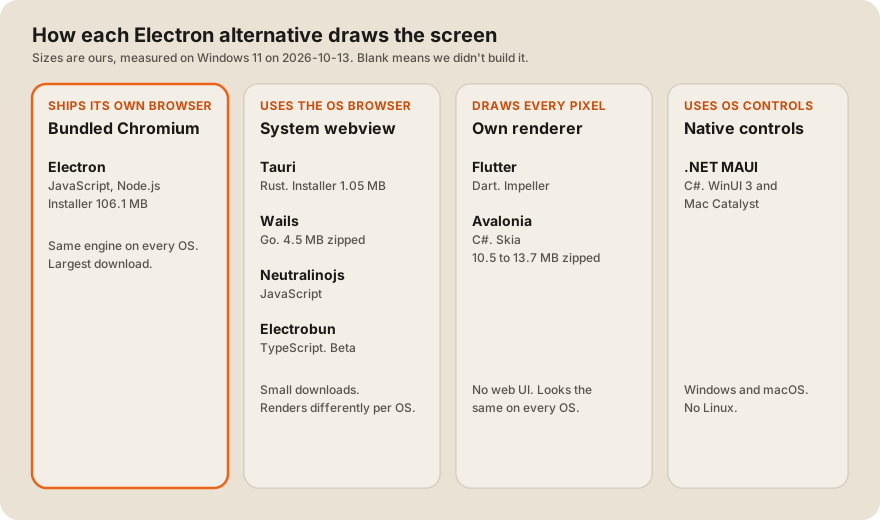
| Framework | App logic in | How it draws | Desktop OSes | Mobile | Our measured download | Licence | Latest stable (checked 2026-10-13 and 14) |
|---|---|---|---|---|---|---|---|
| Electron | JavaScript (Node.js) | Bundled Chromium | Windows, macOS, Linux | No | 106.1 MB installer | MIT | 44.7.2 |
| Tauri | Rust | System webview | Windows, macOS, Linux | iOS, Android | 1.05 MB installer | Apache-2.0 or MIT | 2.12.3 |
| Wails | Go | System webview | Windows, macOS, Linux | v3 only, in beta | 4.5 MB zipped | MIT | 2.16.0 (Go module) |
| Flutter | Dart | Own renderer (Impeller) | Windows, macOS, Linux | iOS, Android | not built | BSD-3-Clause | see Flutter docs |
| .NET MAUI | C# | Native controls | Windows, macOS (Mac Catalyst) | iOS, Android | not built | MIT | 10.0.110 |
| Avalonia | C# | Own renderer (Skia) | Windows, macOS, Linux | iOS, Android | 10.5 MB zipped (13.7 MB as Native AOT) | MIT | 12.1.4 |
| Neutralinojs | JavaScript | System webview | Windows, macOS, Linux | No | not built | see repo | 6.10.0 |
| Electrobun | TypeScript | System webview, or bundled CEF | Windows, macOS, Linux | No | not built | MIT | beta only |
Idle memory, from our benchmark, with one window open on Windows 11 (private bytes over every process the app starts): Tauri 142 MB (median of 5 runs), Electron 149 MB (1 run), Wails 205 to 209 MB (2 runs). We didn’t measure Avalonia’s memory. A WPF build, which uses no browser engine, used 74 MB. In short: webview frameworks save a lot of disk and download, but not much memory, on Windows.
1. Tauri: the closest swap for a web-based Electron app
Tauri keeps the part of Electron most teams care about, a web frontend, and replaces the rest. “Tauri uses WebView2 which is based on Microsoft Edge and therefore Chromium” on Windows, WKWebView on macOS, and webkit2gtk on Linux (Tauri, webview versions). The backend is Rust.
- Size: our Tauri installer was 1.05 MB. The same app in Electron was 106.1 MB. That’s the main reason teams switch.
- Memory: 142 MB idle against Electron’s 149 MB in our one-window test. Expect a much smaller win here than on size.
- Mobile: Tauri 2.0, released October 2, 2024, “extends to iOS and Android”. The team was candid: “We are not completely happy about the developer experience at the moment” (Tauri 2.0 announcement).
- Updates: the updater plugin requires a signature on every update, and “This cannot be disabled” (Tauri updater).
- Catch: three different rendering engines. Test on WebKitGTK early if Linux matters.
- Stars: 111,864 on GitHub (checked 2026-10-13).
Pick Tauri if your app is already a web app and download size or install friction is the complaint.
2. Wails: Tauri’s idea, for Go teams
Wails describes itself as “Build desktop applications using Go & Web Technologies”, and it “Uses native rendering engines - no embedded browser!” (Wails README).
- Size: a single 11.2 MB executable, 4.5 MB zipped, in our test. Larger than Tauri, far smaller than Electron or a self-contained .NET build.
- Memory: 205 to 209 MB in our two runs, the highest of the webview builds we measured. We only ran it twice, so treat that as a rough figure.
- Versions: v2 is the stable line. The newest v2 module on the Go proxy is 2.16.0, published 2026-09-14. Wails v3 was still in beta, with
v3.0.0-beta.29released 2026-10-13 (releases). - Catch: in our runs, Wails start-up was unstable under heavy CPU load. Once its window appeared after 1.1 seconds but the page didn’t call back into Go within 30 seconds. We didn’t find the cause, so we’re not blaming Wails for it, but test start-up on your target machines.
- Stars: 36,536 on GitHub (checked 2026-10-13).
Pick Wails if your backend team writes Go and wants one binary.
3. Flutter: drop the web UI and draw everything
Flutter doesn’t use HTML at all. “Flutter provides support for compiling a native Windows, macOS, or Linux desktop app” (Flutter desktop docs), and it draws the UI itself. On desktop, Impeller “is available and enabled by default as of Flutter 3.47” (Flutter, Impeller).
- Size and memory: we didn’t build it, so we have no number to give you.
- Mobile: the same code runs on iOS and Android, which is Flutter’s main draw.
- Catch: your web components and CSS don’t carry over. It’s a rewrite in Dart.
- Stars: 180,085 on GitHub (checked 2026-10-13).
Pick Flutter if you want one codebase for desktop and mobile and you’re starting the UI from scratch.
4. .NET MAUI: C# with native controls, but no Linux
Microsoft lists MAUI’s targets as Android, iOS, “macOS 12 or higher, using Mac Catalyst”, and Windows “using Windows UI Library (WinUI) 3” (Microsoft Learn, MAUI platforms). Linux isn’t on that list.
- Size and memory: not built in our test.
- Catch: no Linux, and on macOS it runs through Mac Catalyst, so test the Mac build early.
- Stars: 23,325 on GitHub (checked 2026-10-13).
Pick MAUI if your team writes C#, you need Windows, macOS, and mobile, and Linux doesn’t matter. Our post on React Native or .NET MAUI covers the mobile side. If you need to hire for it, see seven things to ask a .NET MAUI developer for.
5. Avalonia: C# that looks the same everywhere, including Linux
“Unlike frameworks that wrap native controls, Avalonia draws its own UI with Skia”, and it targets Windows, macOS, Linux, iOS, Android, and WebAssembly (avaloniaui.net).
- Size: our Avalonia build was 10.5 MB zipped as framework-dependent, and 13.7 MB zipped as a Native AOT build that needs no .NET runtime on the PC.
- Memory: not measured.
- Licence: “The framework is MIT-licensed”. Paid add-ons start at €299 a year per seat for Plus and €899 for Pro (Avalonia pricing, checked 2026-10-14). XPF, which runs existing WPF apps on macOS and Linux, is a separate per-app licence from €9,500 (Avalonia XPF).
- Stars: 31,661 on GitHub (checked 2026-10-13).
Pick Avalonia if you have C# skills or a WPF app, and Linux is a real target.
Also worth a look
- Neutralinojs says it “doesn’t bundle Chromium” and that “A simple uncompressed Neutralinojs app is only ~2MB” (neutralino.js.org, the project’s own claim). 8,669 GitHub stars (checked 2026-10-14).
- Electrobun pairs “System webviews and the Cottontail runtime instead of a bundled Chromium and Node”, with CEF as an option “when you want a pinned browser engine” (Electrobun). Every recent release we saw was a beta, so wait before betting a product on it.
When to stay on Electron
Electron is still the right answer more often than “alternatives” lists suggest. Electron’s docs put it plainly: “By embedding Chromium and Node.js into its binary, Electron allows you to maintain one JavaScript codebase” (Electron docs). That buys you one rendering engine on every OS, the whole npm ecosystem in the main process, and mature packaging and update tools. Stay if:
- Your app relies on Node.js packages or native Node modules in the main process.
- You can’t afford to test against three webview engines.
- Size isn’t a complaint your users actually make.
If you do move, our desktop auto-update guide covers how updates work in both Electron and Tauri, and our list of desktop app development companies scores teams that can do the work.
FAQ
What is the best alternative to Electron?
For most web-based apps, Tauri. In our test it cut the installer from 106.1 MB to 1.05 MB while keeping the same HTML and JavaScript frontend. The backend moves from Node.js to Rust.
Is Tauri better than Electron?
Smaller, yes. Lighter on memory, only a little: 142 MB against 149 MB idle in our one-window Windows test. Electron gives you the same Chromium on every OS, which Tauri can’t.
What is a lightweight alternative to Electron for Go developers?
Wails. It wraps a Go backend and a web frontend in one binary and uses the system webview. Our build was 4.5 MB zipped. Wails v3 is still in beta, so most teams should use v2.
Can I use C# instead of Electron?
Yes. Avalonia runs on Windows, macOS, and Linux and draws its own UI. .NET MAUI uses native controls but has no Linux support. WPF is Windows only.
Does Flutter work for desktop apps?
Yes. Flutter compiles to native Windows, macOS, and Linux apps, and uses Impeller by default on desktop as of Flutter 3.47. You write the UI in Dart rather than HTML and CSS.
Weighing a move off Electron for a real app? Our desktop app team builds in Tauri, Electron, and .NET, and we’ll tell you honestly if staying put is the cheaper call.