
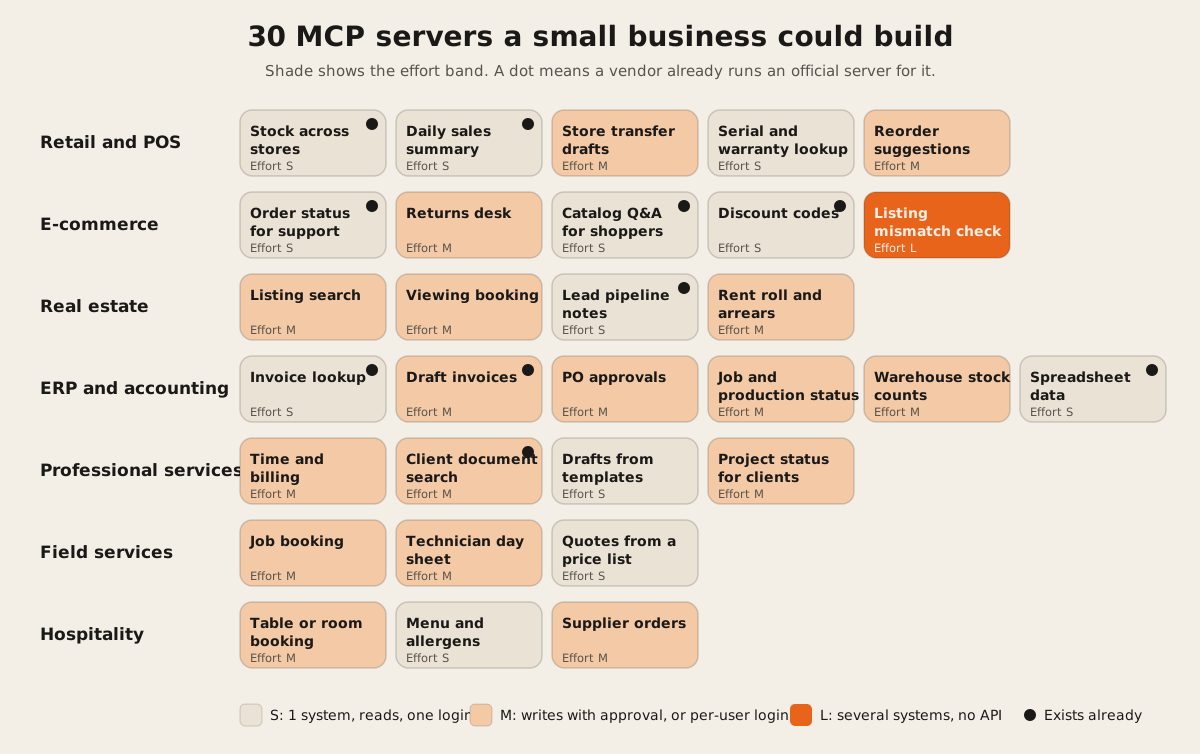
The MCP servers that pay off for a small business answer the questions staff ask all day, from the system that already holds the answer: “Is it in stock at the other store?”, “Has this invoice been paid?”, “When is the next free slot?”. Below are 30 of them across seven industries, each with its tool names and inputs, an effort band, and a note on whether a vendor already runs an official server, so you don’t build what exists.
Ten of the 30 are already covered, at least in part, by an official server from Shopify, Square, Stripe, PayPal, QuickBooks, Xero, HubSpot, Box, or Notion, or by a connector platform. If your business runs on one of those, connect theirs first and build only the gap.
Who this is for: owners and ops leads who have heard “you need an MCP server” and want to know what one would actually do in their business. Who should look elsewhere: if you want to know what MCP is first, read when a business needs an MCP server. If your systems are all well-known SaaS, a connector platform such as Zapier’s MCP may cover you without any build.
The lists that rank for “MCP server examples” today mostly name developer tools, like GitHub, Slack, and Linear, or describe use cases in a sentence. Few say which tools a server would expose, what each tool takes as input, or which ideas are already solved by the vendor. That’s what this list adds.
How to read this list
Tools are what the AI can call. We give each a name and its inputs, in the style the MCP tools spec uses: short names, letters, digits, underscores, hyphens, and dots only.
Reads or writes. Reads answer questions. Writes change something. A good first server is read-only. Writes should ask a person first, which the spec recommends: “there SHOULD always be a human in the loop with the ability to deny tool invocations.”
Effort band. We don’t publish prices here, because effort depends on your systems more than on the idea. The bands follow the same three rules for every idea:
| Band | What puts an idea in it |
|---|---|
| S | One system with a working API. Read tools only, or a single write that creates a draft. One login for the whole business. |
| M | Writes that change real records, with an approval step. Or a login per user (OAuth), so each person sees only their own data. Or 5 or more tools. |
| L | Two or more systems that must agree, or a system with no API, so the server needs its own sync or database access. |
Exists already links the vendor’s own docs or a live server we checked on 2026-10-13. An official server can still miss your exact need, so read its tool list before deciding.
What a well-built server looks like
Before the list, one real example to copy. Shopify’s public server at mcp.shopify.com/mcp lists 30 tools. We read its tool list on 2026-10-13. A few things it does well:
- Read and write tools are separate.
get-inventory-levelsreads.set-inventorywrites. The model can’t change stock by accident while looking it up. - Every tool carries hints. 18 of 30 are marked
readOnlyHint: true. Four writes are markeddestructiveHint: true:update-product,set-inventory,bulk-update-product-status, andgraphql_mutation. Clients can use those to decide when to ask you first. - Descriptions say when to use a tool. The
set-inventorydescription tells the model to callget-inventory-levelsfirst.
The spec warns that clients “MUST consider tool annotations to be untrusted unless they come from trusted servers”, so hints don’t replace a real approval step. They do make one easier to build.
Retail and POS
| # | Idea | Tools and inputs | Reads or writes | Effort | Exists already |
|---|---|---|---|---|---|
| 1 | Stock across stores. “Do we have the blue one in size 10 at the other branch?” | get_stock(sku or name, location?), nearest_in_stock(sku, from_location) | Reads | S | Shopify: get-inventory-levels on its server. Square: inventory is in its API server. |
| 2 | Daily sales summary for the owner | sales_summary(date_from, date_to, location?), top_items(date_from, date_to, limit) | Reads | S | Shopify: run-analytics-query. Square: orders and payments APIs through its server. |
| 3 | Transfer drafts between stores | list_open_transfers(location?), draft_transfer(sku, qty, from, to) | Writes a draft. A manager sends it. | M | Not as one tool in the servers we read. |
| 4 | Serial number and warranty lookup | find_by_serial(serial), warranty_status(serial) | Reads | S | No. Most POS systems don’t track units by serial. See serialized inventory. |
| 5 | Reorder suggestions | low_stock(location, below_days_of_cover), draft_purchase_order(supplier, lines) | Reads, plus a draft | M | No. |
Start with idea 1. It’s the question store staff ask most, and it’s read-only.
E-commerce
| # | Idea | Tools and inputs | Reads or writes | Effort | Exists already |
|---|---|---|---|---|---|
| 6 | Order status for support staff | get_order(order_number), track_shipment(order_number) | Reads | S | Shopify: list-orders, get-order. Stripe and PayPal cover payment status (Stripe, PayPal). |
| 7 | Returns desk | check_return_eligibility(order_number), create_return(order_number, items, reason), issue_refund(return_id) | Writes. Refunds need approval. | M | Partly. Payment refunds exist in Stripe and PayPal. The return policy logic is yours. |
| 8 | Catalog questions for shoppers | search_catalog(query, filters), get_product(id) | Reads public data | S | Shopify moved storefront tools to its catalog and cart servers (Shopify docs). |
| 9 | Discount codes on request | create_discount(percent, expires_at, usage_limit) | Writes | S | Shopify: create-discount. |
| 10 | Listing mismatch check across marketplaces | compare_listing(sku, channel), list_mismatches(channel, field) | Reads | L | No. It needs data from your store and each marketplace. See keeping Shopify in sync. |
For idea 6 with customers, not staff, the server must confirm who’s asking, such as order number plus email, or a customer login. That pushes it to M.
Real estate
| # | Idea | Tools and inputs | Reads or writes | Effort | Exists already |
|---|---|---|---|---|---|
| 11 | Listing search on your own listings | search_listings(area, price_min, price_max, beds, type), get_listing(id) | Reads | M | No open server from the big portals that we could confirm. Build on your own listings or a feed you’re licensed to use. |
| 12 | Viewing booking | available_slots(listing_id, date), book_viewing(listing_id, slot, name, phone) | Writes | M | No. |
| 13 | Lead pipeline notes for agents | list_leads(stage, agent), add_note(lead_id, text) | Reads, plus a note | S | If your CRM is HubSpot: HubSpot’s server. |
| 14 | Rent roll and arrears for property managers | rent_status(property, month), list_arrears(days_overdue) | Reads | M | No. Often the data sits in a spreadsheet or an old system. |
Listing data is where real estate gets hard. Portal and MLS data usually comes with license terms. Check yours before you let an AI repeat it to the public. Our post on what a real estate portal needs that a WordPress theme can’t do covers the data side.
ERP, accounting, and operations
| # | Idea | Tools and inputs | Reads or writes | Effort | Exists already |
|---|---|---|---|---|---|
| 15 | Invoice lookup | find_invoice(customer or number), unpaid_invoices(older_than_days) | Reads | S | QuickBooks: Intuit’s server. Xero: Xero’s server, which you host yourself. |
| 16 | Draft invoices | create_invoice_draft(customer, lines, due_date) | Writes a draft | M | QuickBooks and Xero servers above. Stripe and PayPal for payment links. |
| 17 | Purchase order approvals | list_pending_pos(), approve_po(po_id, note) | Writes. Approval is the point. | M | No. |
| 18 | Job and production status | job_status(job_id or customer), late_jobs() | Reads | M | No. This data lives in your own system. |
| 19 | Warehouse stock counts | start_count(location), record_count(location, sku, qty), count_variance(count_id) | Writes | M | No. |
| 20 | Spreadsheet-backed data | query_sheet(sheet, filter), append_row(sheet, values) | Reads, plus append | S | Connector platforms cover Google Sheets and Airtable. If the sheet has become your system, read the signs a spreadsheet became an ERP. |
Ideas 17 to 19 are where a custom server earns its keep. The data sits in software only you use, so no vendor will build the server for you.
Professional services
| # | Idea | Tools and inputs | Reads or writes | Effort | Exists already |
|---|---|---|---|---|---|
| 21 | Time and billing | log_time(project, hours, note), unbilled_hours(client) | Writes | M | No, unless your time tracker ships one. |
| 22 | Client document search | search_documents(client, query), get_document(id) | Reads | M | Box: Box MCP. Notion: Notion MCP. |
| 23 | Drafts from templates | list_templates(), draft_from_template(template, client, fields) | Writes a draft | S | No. |
| 24 | Project status for clients | project_status(project_id), next_milestone(project_id) | Reads | M | No. Clients must log in and see only their own projects. |
Idea 22 is M because of permissions. A staff member should only find documents they could already open. The server has to pass the user’s own login through, never a shared admin key.
Field services and trades
| # | Idea | Tools and inputs | Reads or writes | Effort | Exists already |
|---|---|---|---|---|---|
| 25 | Job booking | open_slots(service, postcode, date), book_job(slot, customer, address, notes) | Writes | M | Not in the official servers we checked. |
| 26 | Technician day sheet | my_jobs(date), update_job_status(job_id, status, note) | Writes | M | No. |
| 27 | Quotes from a price list | price_item(code, qty), draft_quote(customer, lines) | Writes a draft | S | No. |
Hospitality
| # | Idea | Tools and inputs | Reads or writes | Effort | Exists already |
|---|---|---|---|---|---|
| 28 | Table or room booking | check_availability(date, party_size or room_type), create_booking(slot, name, phone) | Writes | M | Depends on your booking system. We didn’t confirm an official server for the common ones. |
| 29 | Menu and allergens | search_menu(query), get_allergens(item) | Reads public data | S | No. |
| 30 | Supplier orders | par_levels(location), draft_order(supplier, lines) | Reads, plus a draft | M | No. |
Idea 29 is the easiest server on this page and one of the most useful. Allergen answers must come from your data, not from the model’s guess.
Four rules that apply to every idea
- Start read-only. Ship the read tools, watch how people use them for a few weeks, then add writes.
- Make writes drafts first.
draft_transfer,draft_order, andcreate_invoice_draftlet a person check and send. Our post on making an agent wait for human approval shows the pattern. - Keep the tool list short. Every tool’s definition is sent to the model on every request. Our MCP token cost calculator shows what a long list costs.
- Pass the user’s own login. If people should see different data, the server needs per-user OAuth. See adding OAuth to an MCP server.
How many servers already exist?
Plenty, but few for small-business systems. The official MCP Registry is still in preview and is meant to feed other directories, not to be browsed by end users. When we checked 36 public servers for our MCP server checker work, almost all came from software companies that serve many industries at once. None was built for trades, property management, or hospitality software. That gap is where a custom server is most likely to be worth building.
FAQ
What is the simplest MCP server a small business can start with?
A read-only server over one system with an API, such as stock levels (idea 1), invoice status (idea 15), or menu and allergens (idea 29). Two or three tools, one login, no writes. It answers real questions on day one and carries little risk.
Do I need to build an MCP server if I use Shopify or QuickBooks?
Often not. Shopify, Square, Stripe, PayPal, QuickBooks, Xero, and HubSpot all have official servers, linked in the tables above. Connect theirs first. Build only when you need data from your own systems, or rules the vendor’s tools don’t know.
Can an MCP server work with a system that has no API?
Yes, but that’s what puts an idea in the L band. The server then reads a database directly, a file export, or a sync copy. Ask for read-only database access first, and keep writes in the original system.
Can customers use these, or only staff?
Both, but customer-facing servers need more care. They need a login or a verification step, and they should only reach that customer’s data. Start with a staff-facing version, which tells you which questions matter before you open it up.
How long does a small MCP server take to build?
It depends more on your systems than on the idea, which is why we show effort bands rather than weeks. An S-band server over a clean API is the smallest job here. An L-band server is mostly integration work. If you’d like a quote for one of these, we scope MCP servers in writing before work starts.